Your spreadsheet. Your dashboard. Your AI analyst.
Turn business data into an interactive dashboard. Explore the numbers, uncover patterns, and use AI to help explain what matters.
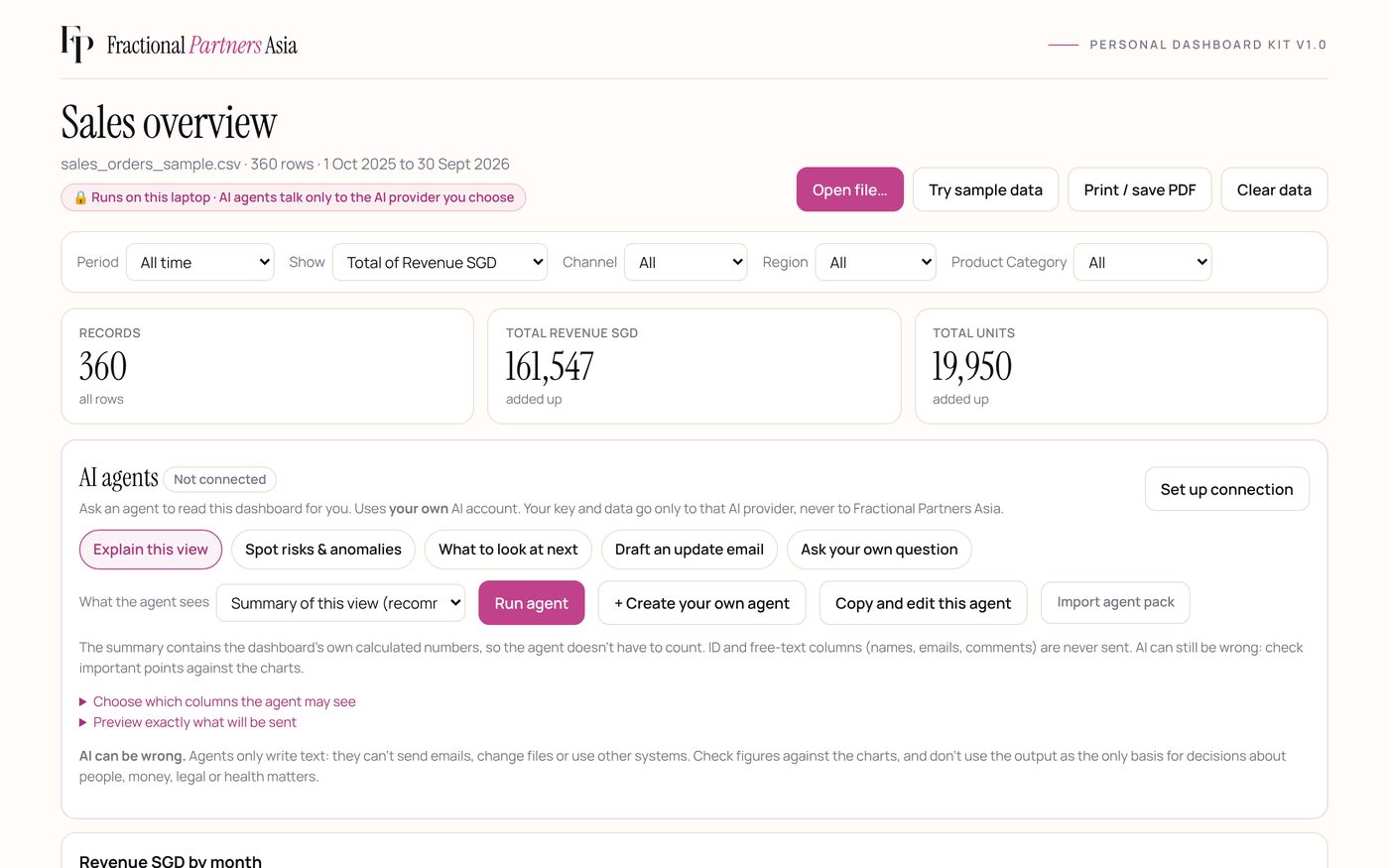
From spreadsheet to explained dashboard, in a few clicks.
A 24-second recording of the actual dashboard using the kit's sample data. No voice-over.
Load your data
Drag a CSV or Excel file onto the page, or click Try sample data. Nothing is uploaded.
Review the key numbers
Totals, counts and averages are calculated for you.

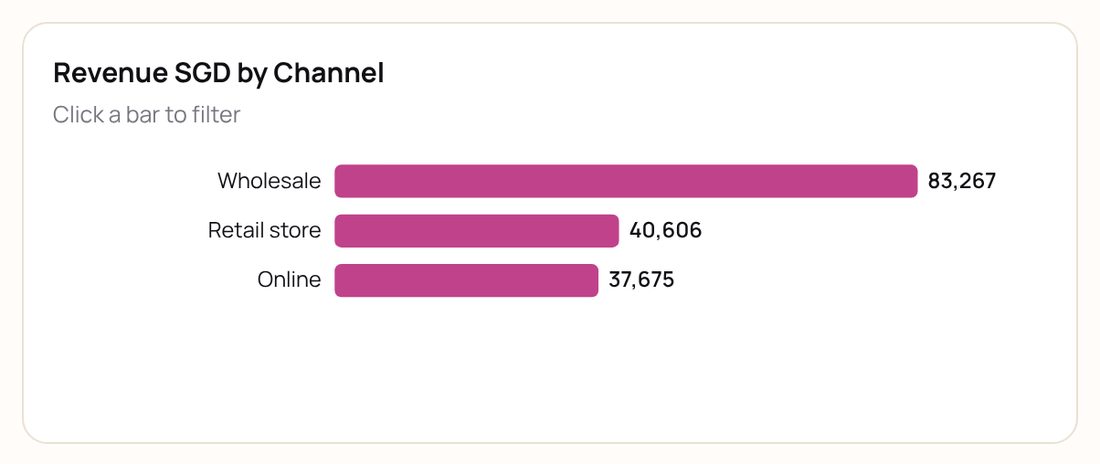
Explore a chart or trend
Every category gets a chart. Click a bar to filter the whole dashboard.
Choose an AI action
Explain this view, spot risks, what to look at next, draft an update, ask your own question, or let the AI set up the view for you.

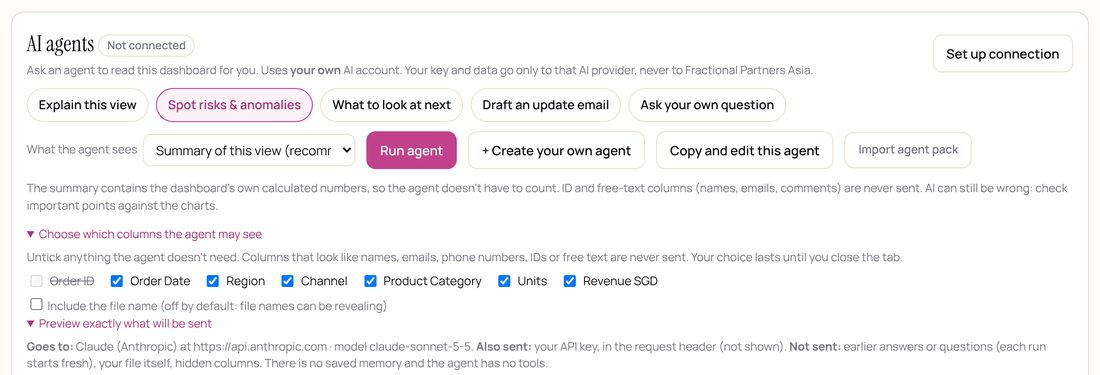
Check what the agent will receive
Untick columns it doesn't need, then preview the exact message, before anything is sent.
Run the agent
The summary goes to the AI provider you connected, using your own key. Nothing goes to us.
Review the analysis
Check the answer against the charts. The numbers come from the dashboard; the interpretation is the AI's, and can be wrong.
Try the live dashboard here (sample data only, no AI)
Pick the edition that fits.
Download editions are a one-time licence with all version 1 updates and email support. AI usage is billed separately by your AI provider. PayNow to our UEN. We email an invoice; the kit is emailed once payment is received.
Dashboard
1 named person
The interactive dashboard, without AI.
- Turn any CSV or Excel file into a dashboard
- Filters, charts, your own categories, print to PDF
- Runs in your browser; cannot connect to the internet
- All v1 updates, email support
Dashboard + AI
1 named person
Everything in Dashboard, plus AI agents using your own AI account.
- Everything in Dashboard
- 5 built-in agents, 4 agent packs, your own agents
- “Set up the view for me”: describe it, the AI sets the filters and chart
- Works with OpenAI, Claude or a company/local AI
- AI usage is billed by your AI provider, not by us
Team
up to 10 people in one organisation
Both editions for your team.
- Dashboard and Dashboard + AI
- Up to 10 named people in one organisation
- All v1 updates, priority email support
Hosted on FPA
or SGD 490 a year · your whole team
Use it from your own web address instead of downloading.
- Your own private web address, e.g. yourcompany.fpahrdesk.asia
- Sign-in protected, for your whole team
- Always the latest version, nothing to install
- Your company name and colours on the dashboard
- Cancel any time
Part-Timer Scheduling Pack · SGD 29
Six AI agents for part-timer rosters: shift coverage gaps, no-shows, weekly hours (flags anyone near 35 hours), labour cost, next week's roster and a weekly brief. Needs Dashboard + AI, Team or Hosted.
Your brand, for your clients
For consultants and firms who want to offer the dashboard under their own brand. Scope, branding, number of clients, support and commercial rights are agreed in writing for each engagement.
| What you get | Dashboard | Dashboard + AI | Team | Hosted |
|---|---|---|---|---|
| Dashboards, charts, filters, your own categories, PDF | ✓ | ✓ | ✓ | ✓ |
| Runs offline; blocked from the internet | ✓ | Only the AI provider you choose | ✓ (Dashboard file) | Online by design |
| AI agents (built-in, packs, your own) | – | ✓ | ✓ | ✓ |
| Who may use it | 1 named person | 1 named person | Up to 10, one organisation | Your team |
| Billing | One-time | One-time | One-time | Monthly or yearly |
| AI usage costs | – | Billed by your AI provider, not included | ||
Because the kit is a digital product, sales are final once it has been emailed to you. If it does not open or work as described, email us and we will fix it or refund you. Each copy is licensed to one named person and shows their name on screen and on every printed page. Need it for more people? Choose Team or Hosted, or add users to a licence you already have. Licence and limits.
Use the AI you already trust.
Dashboard + AI connects to one of three options. You supply your own credentials, and your provider may charge for usage.
OpenAI
Your OpenAI API key and a model your account can use. Test connection checks the key and model name.
Claude (Anthropic)
Your Anthropic API key and a Claude model name. Built to Anthropic's documented API, and tested against it for sign-in and error handling.
Company or local AI
An OpenAI-compatible server on your computer or your organisation's approved AI server. Compatibility and data handling depend on that server.
What the AI can and can't do: it explains what's on screen, flags things worth checking, drafts updates, and can set up the view for you (filters, period, chart) once you click Apply. It can't redesign the dashboard or add new chart types, formulas or data. For that, the kit includes prompts for your own AI assistant to rewrite the file.
Not every model or product is guaranteed to work. No streaming, tools or memory. Details: compatibility guide · AI setup guide · agent safety.
You decide what the AI sees.
Checked against the source code and automated tests, October 2026. Applies to the download editions.
| Your spreadsheet | Opened inside your browser tab. Not uploaded anywhere. |
| Dashboard edition | A built-in safety lock blocks every internet connection. |
| Sent to the AI (Dashboard + AI) | Only when you click Run agent: a summary of the current view, which you can preview. Name, ID, contact and free-text columns are excluded, and you can untick others. |
| Your API key | Kept in the open tab only, never saved, and sent only to the provider you chose. Forget key clears it. |
| Stored by FPA | Nothing from your dashboard. The kit has no connection to our servers. We hold only your order and licence details. |
| History and memory | None. Each run starts fresh; closing the tab clears data, key and agents. |
| What you can delete | Everything in the dashboard (close the tab), plus any agent files you saved. Data already sent to an AI provider follows that provider's retention rules. |
Columns are recognised as personal by their heading, so always check the preview. Full details: data, privacy and memory.
Built for people who live in spreadsheets.
Consultants
- Turn client data into clear management dashboards
- Prepare analysis for client discussions
- Get first drafts of management updates
SME owners and managers
- Review revenue, sales and operational trends
- Spot areas that deserve a closer look
- Make routine reporting easier to read
Finance and operations
- Explore patterns in structured data
- Flag possible anomalies for human review
- Draft commentary from verified figures
AI-enabled fractional professionals
- Add data analysis and reporting to your services
- Reuse dashboard and agent workflows across engagements
- Cut repetitive reporting where the kit fits
These are typical uses, not promised results. AI suggestions need human judgement.
A tool you use yourself.
The Personal Dashboard Kit is a ready-made product: you buy it and run it. It is separate from FPA HR Desk (HR tools and workflows), AI Agent Studio (agents built for a specific workflow) and our AI transformation work (redesigning and automating how work gets done). If you need live data connections or agents that take actions, those are the services to look at.
Questions
What is the FPA Personal Dashboard Kit?
Two files you open in your web browser. Drop in a spreadsheet and you get key numbers, charts, filters and a monthly trend. The Dashboard + AI edition adds AI agents that read a summary of what is on screen and explain it, flag things worth checking, suggest what to look at next or draft an update, using your own AI account.
Do I need coding skills?
No. You double-click a file and drag your spreadsheet onto it. To change colours or add features, the kit includes copy-and-paste prompts for an AI assistant, but you never have to.
What data formats does it support?
CSV and Excel (.xlsx, .xls, .xlsm and more), including workbooks with several tabs. It works best with one row per record, such as an order, a ticket or a person. It tidies common report layouts: it skips title rows, ignores Total rows, and can turn month columns into rows with one click. Files of around 200,000 rows open in a few seconds. Password-protected files need the password removed first.
Which AI providers are supported?
Three options: OpenAI, Claude (Anthropic) and Company or local AI (servers that speak the OpenAI Chat Completions format). OpenAI has been tested with a live account. Claude is built to Anthropic's documented API and tested against it for sign-in and errors; a full live run is in progress. Company/local AI has been tested with a local test server. Details are in the compatibility guide.
Do I need my own API key?
Yes, for OpenAI and Claude: you create a key in that provider's developer console and paste it into the dashboard. A company or local AI server may or may not need one. The Dashboard edition (without AI) needs nothing.
Are AI provider charges included?
No. AI usage is billed by your provider to your API account, usually a small amount per run (see your provider's price list). A ChatGPT or Claude.ai subscription does not include API usage; API billing is separate.
Where is my dashboard data stored?
In the open browser tab only. The kit doesn't upload your file, has no connection to our servers, and saves nothing in the browser: close the tab and it's gone. The Dashboard edition is blocked from connecting to the internet at all. In the Dashboard + AI edition, when you click Run agent, a summary of the current view goes to the AI provider you chose. You can preview it and choose which columns are included. What the provider keeps is set by its own policies. The hosted plan comes with its own data-handling notice.
Does the AI remember previous conversations?
No. Each run sends one fresh request with no earlier questions or answers, and there is no saved memory. Your API key, custom agents and imported packs are forgotten when you close or refresh the tab. You can save your agents to a file and load them again later.
Can I create my own AI agents?
Yes, in Dashboard + AI. An agent is a name plus written instructions, for example: “Compare this month with last month by region and list the three biggest drops.” You can edit, copy, delete and save them. Agents only write text: they can't send emails, change files or use other systems.
Can the AI customise the dashboard for me?
Partly. In Dashboard + AI, Set up the view for me lets you describe what you want to see, for example “online sales in the East for the last 3 months by product”. The AI then suggests the filters, period, measure and chart. Nothing changes until you click Apply, and you can undo. It can only choose settings the dashboard already has. It can't add new chart types, target lines, formulas, colours, layout or data, and it tells you when part of your request can't be done. For bigger changes, the kit includes copy-and-paste prompts for your own AI assistant (such as Claude or ChatGPT) to rewrite the file. Results depend on the assistant, so keep a copy of the original.
Can I import an agent pack?
Yes. A pack is a small file of agent names and instructions. Four are included (Sales & Retail, Finance & Admin, HR & People, Operations & Service), and add-on packs such as Part-Timer Scheduling are available. Packs can't contain code, connections or keys: the importer reads only names and instructions, and asks you to confirm.
Can I use a company-hosted or local AI model?
Yes, if it accepts the OpenAI Chat Completions format, uses https (or runs on your own computer), allows browser requests, and its address is added to the dashboard's safety lock. Products differ: for example, Azure OpenAI won't work as-is. A local or company server isn't automatically private, so check what it logs. See the setup guide.
Can I customise the dashboard?
Yes. Rename it, create your own categories (group values or set number bands) and choose what to show. Colours and fonts sit in one clearly marked section of the file. The licence asks you to keep the Fractional Partners Asia credit.
What does the white-label edition include?
It isn't an off-the-shelf download. For consultants and firms who want to offer the dashboard under their own brand. Scope, branding, number of clients, support and commercial rights are agreed in writing for each engagement. Today the kit runs in each user's browser, with no shared server and no separate infrastructure per client. Tell us what you need.
Can consultants use the kit with clients?
Yes, for your own work: a Personal licence holder can analyse client data they're authorised to handle and share the resulting PDFs and screenshots. Giving the kit files to a client needs that client's own licence, or a white-label agreement.
Can I share the dashboard with colleagues?
Each copy is licensed to one named person (Team: up to 10 named people in one organisation). It shows the licence holder's name and licence number on screen and on every printed page. A shared copy still opens, but it carries the buyer's name and isn't covered by the licence. To add people, click Add users in the dashboard, or order here: choose Team for up to 10 people with their own copies, or Hosted to add and remove people with a sign-in. The downloaded files never connect to us, so they can't add people by themselves.
What are the product's limitations?
It shows the file you load, not a live connection to your systems. It works on one table at a time, in a desktop browser. AI answers can be wrong and must be checked against the charts. Agents have no memory and can't take actions outside the dashboard. The AI can change the view only through settings that already exist, and can't redesign the dashboard. The privacy filter recognises personal columns by their heading, so check the preview. It isn't a data warehouse or a replacement for a qualified analyst.
Start with your own spreadsheet.
Order online, pay by PayNow, and the kit is emailed to you once payment is received.